Normally, fetching live data requires a server, but we can pull the Twitch status for a channel directly from the browser using JavaScript - no backend setup needed. I also added a subtle pulsing animation when live to make it stand out visually. I’m using Github’s Twitch channel as an example
Live Demo (updates every 60s)
The Goal
I wanted a card on my site that:
- Shows whether my stream is live
- Displays the duration if live
- Updates automatically every minute
- Works on a completely static Jekyll site
Step 1: HTML Structure
I added a simple card in my index.md
<div id="twitch-status" class="twitch-card">
  <a href="https://www.twitch.tv/github" target="_blank" rel="noopener">
    <div class="text-block">
      <strong id="twitch-text">Checking status...</strong>
      <span class="duration"></span>
    </div>
  </a>
</div>
Step 2: JavaScript to Fetch Status
I use decapi.me to fetch Twitch uptime. Here’s the JavaScript:
// Twitch Status Widget
    async function updateTwitchStatus() {
    try {
        const res = await fetch("https://decapi.me/twitch/uptime/github");
        const text = await res.text();

        const card = document.getElementById("twitch-status");
        const textBlock = card.querySelector(".text-block");
        const mainText = textBlock.querySelector("#twitch-text");
        const durationEl = textBlock.querySelector(".duration");

        if (text.toLowerCase().includes("offline")) {
        mainText.textContent = "Stream Offline";
        durationEl.textContent = "";
        card.classList.remove("live");
        } else {
        mainText.textContent = "Live on Twitch";
        durationEl.textContent = text;
        card.classList.add("live");
        }
    } catch (err) {
        console.error("Failed to fetch Twitch status:", err);
        const card = document.getElementById("twitch-status");
        const textBlock = card.querySelector(".text-block");
        textBlock.querySelector("#twitch-text").textContent = "🐠 Stream status unavailable";
        textBlock.querySelector(".duration").textContent = "";
        card.classList.remove("live");
    }
    }

    // Initial load + refresh every 60s
    updateTwitchStatus();
    setInterval(updateTwitchStatus, 60000);
Step 3: Styling
Here’s the CSS I added to style.css:
.twitch-card {
    background: #f4f4f4;
    color: #111;
    max-width: 260px;
    margin: 0 auto;
}

.twitch-card.live {
    background: rgba(0, 128, 255, 0.3);
    animation: twitchPulse 1.8s infinite ease-in-out;
    border: 1px solid rgba(78, 228, 78, 0.6);
}

@keyframes twitchPulse {
    0%, 100% { box-shadow: 0 0 8px rgba(78, 228, 78, 0.3); }
    50% { box-shadow: 0 0 16px rgba(78, 228, 78, 0.6); }
}
The live class triggers both the background color and the pulsing animation when the stream is live.
Step 4: Result
- The card updates automatically every 60 seconds.
- Shows Live or Offline instantly.
- Pulses subtly when live for attention.
- Works entirely on a static Jekyll site.
Example
Here’s how it looks in the wild:
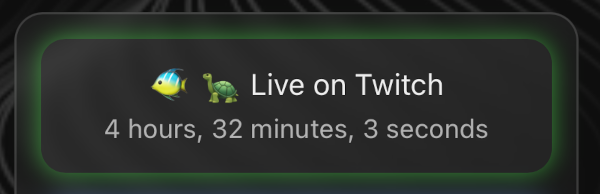
Integrated Twitch Live status