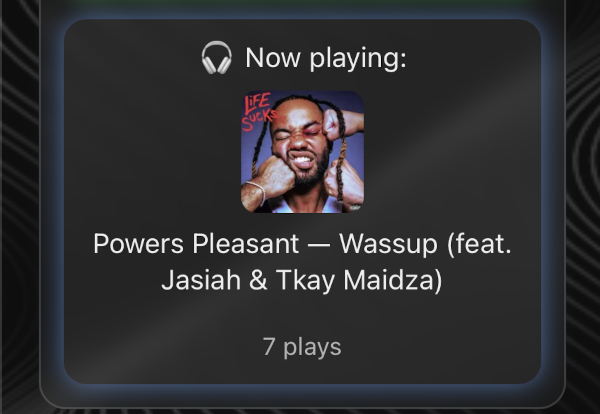
Music is a big part of my life. I’ve been scrobbling to Last.fm for years now (since 2008, to be exact) and I wanted to show what I was currently listening to on my personal site.
The result: a small widget that shows what I’m currently listening to (or last listened to), the album art, and how many times I’ve played that track.
What It Does
- 🎧 Shows “Now playing” if a track is actively scrobbling
- 🎧 Falls back to “Last played” with a time ago stamp if nothing is playing
- Displays album art (clickable, opens my Last.fm library)
- Shows my personal play count for that track
- Refreshes automatically every 60 seconds
- Pulses with a soft blue glow when something is actively playing
The API
Last.fm has a free, public API. You just need to register for an API key at last.fm/api.
The two endpoints I used:
user.getrecenttracks— pulls the most recent scrobble, and flags it asnowplayingif it’s livetrack.getInfo— pulls metadata for a specific track, including your personal play count
The HTML
A simple card structure:
<div id="music" class="now-item">
  <div id="track-status">🎧 Loading music...</div>
  <img id="album-art" src="" alt="Album art" />
  <div id="track-name"></div>
  <div id="track-timestamp"></div>
  <div id="track-playcount"></div>
</div>
The JavaScript
The main function fetches recent tracks, checks if something is actively playing, then fires a second request to get the play count:
const LASTFM_API_KEY = "your_api_key_here";
const LASTFM_USER = "your_username";
const REFRESH_MS = 60000;

async function updateNowPlaying() {
  const recentUrl = `https://ws.audioscrobbler.com/2.0/?method=user.getrecenttracks&user=${LASTFM_USER}&api_key=${LASTFM_API_KEY}&format=json&limit=1`;
  const res = await fetch(recentUrl);
  const data = await res.json();
  const track = data?.recenttracks?.track?.[0];

  const artist = track.artist["#text"];
  const title = track.name;
  const art = track.image?.[2]?.["#text"] || "";
  const isNowPlaying = track["@attr"]?.nowplaying === "true";

  document.getElementById("track-status").textContent =
    isNowPlaying ? "🎧 Now playing:" : "🎧 Last played:";
  document.getElementById("track-name").textContent = `${artist} — ${title}`;
  document.getElementById("album-art").src = art;

  if (!isNowPlaying && track.date?.uts) {
    const diffMinutes = Math.floor((new Date() - new Date(track.date.uts * 1000)) / 60000);
    document.getElementById("track-timestamp").textContent =
      diffMinutes < 60 ? `scrobbled ${diffMinutes} min ago`
                       : `scrobbled ${Math.floor(diffMinutes / 60)} hr ago`;
  }

  const infoUrl = `https://ws.audioscrobbler.com/2.0/?method=track.getInfo&api_key=${LASTFM_API_KEY}&artist=${encodeURIComponent(artist)}&track=${encodeURIComponent(title)}&user=${LASTFM_USER}&format=json`;
  const infoRes = await fetch(infoUrl);
  const infoData = await infoRes.json();
  document.getElementById("track-playcount").textContent =
    `${infoData?.track?.userplaycount || 1} plays`;
}

function animateBoxUpdate(box, callback) {
  box.style.opacity = 0;
  box.style.transform = "translateY(4px)";
  setTimeout(() => {
    callback();
    box.style.opacity = 1;
    box.style.transform = "translateY(0)";
  }, 300);
}

updateNowPlaying();
setInterval(updateNowPlaying, REFRESH_MS);
The CSS
#music {
  background: rgba(255, 255, 255, 0.05);
  border-radius: 12px;
  padding: 0.9rem 1rem;
  display: flex;
  flex-direction: column;
  align-items: center;
  gap: 0.45rem;
  width: 250px;
  transition: all 0.25s ease;
}

#music:hover {
  transform: translateY(-2px) scale(1.01);
}

#music img#album-art {
  width: 72px;
  height: 72px;
  border-radius: 8px;
  object-fit: cover;
  cursor: pointer;
}

#music.playing {
  animation: musicPulse 2s infinite ease-in-out;
  border-color: rgba(120, 170, 255, 0.6);
}

@keyframes musicPulse {
  0%, 100% { box-shadow: 0 0 6px rgba(120, 170, 255, 0.35); }
  50%       { box-shadow: 0 0 14px rgba(120, 170, 255, 0.6); }
}
Tools & Skills
- Last.fm API
- Vanilla JavaScript (async/await, fetch)
- CSS animations
- GitHub Pages
- HTML
- JSON / REST APIs
- AI-assisted development
What’s Next
I also built a Twitch stream status card alongside this one — same pattern, different API. I wrote that one up here.